Replace a printer’s driver with WinUSB using Zadig when Chrome or Edge on Windows can’t open the printer.
On Windows, the printer can be missing from the browser’s list of USB printers, or connecting it can fail with Windows is using its own driver for this printer. Switch the printer’s USB driver to WinUSB, then try again. Either way, Windows is holding the printer with its own print driver, and replacing that driver with WinUSB using the free tool Zadig fixes it, once per computer for each printer model.
Turn the printer on and connect it to the computer over USB. Zadig asks for
administrator approval through User Account Control. Unplug other USB devices,
such as receivers and headsets, so the printer is easy to find in Zadig’s
list.
After the driver is replaced, Windows no longer lists the printer under
Printers & scanners. Other Windows software can’t print to it until you switch
it back.
1
Download and run Zadig
Download the current release from zadig.akeo.ie.
It’s a single .exe file that runs without installing, so open it and
approve the User Account Control prompt.
2
List all devices
Open the Options menu and select List All Devices. Until you do, Zadig hides
devices that already have a driver, including the printer.
Zadig's Options menu
3
Select the printer
Select the printer in the device list. Zebra printers appear under their USB
name, for example ZTC ZD220-203dpi ZPL.
The device list in Zadig
4
Check the USB ID
Check that the first USB ID box reads 0A5F for Zebra, or 36EC or 1C8A
for Nemonic. Any other value means another device is selected.
5
Replace the driver
Check that the target driver on the right reads WinUSB, then select Replace
Driver. Wait until Zadig reports that the driver is installed.
The target driver and Replace Driver
6
Restart and connect
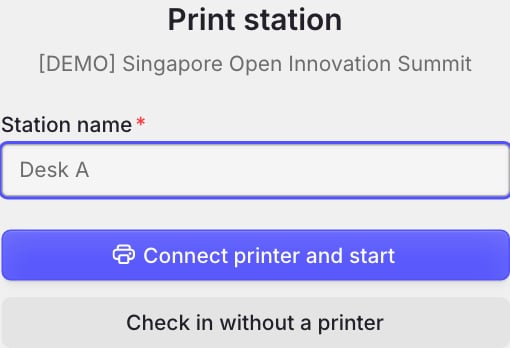
Restart the computer, then connect the printer as usual. Select Connect
printer and start on a new print station,
Connect printer in the header of a running one, or Test print in the
badge template editor.
The print station setup screen
Switch the printer back
To use the printer with other Windows software again, open Device Manager, find the printer under Universal Serial Bus devices, and uninstall it with the option to remove its driver selected. Then unplug the printer and plug it back in.
Troubleshooting
The printer isn't in Zadig's list
Check that List All Devices is selected in the Options menu, and that the
printer is on and connected over USB.
The same message appears after replacing the driver
Check that the computer was restarted. If the message still appears, the
replaced driver may belong to another device. In Zadig, select the device
whose first USB ID box reads 0A5F, 36EC, or 1C8A and replace its
driver.
⌘I
{"docsConfig":{"theme":"luma","$schema":"https://mintlify.com/docs.json","name":"Umoh Docs","colors":{"primary":"#5252FC","light":"#7888FF","dark":"#5252FC"},"logo":{"light":"https://mintcdn.com/umoh/jp2Ge0FpdYjqZlhi/logo/light.svg?fit=max\u0026auto=format\u0026n=jp2Ge0FpdYjqZlhi\u0026q=85\u0026s=18caaf37c96c155b5fead0bab93f1b19","dark":"https://mintcdn.com/umoh/jp2Ge0FpdYjqZlhi/logo/dark.svg?fit=max\u0026auto=format\u0026n=jp2Ge0FpdYjqZlhi\u0026q=85\u0026s=e9d6b1b5c4fd7906fa4a3954693a01db","href":"https://umoh.io"},"favicon":"https://mintcdn.com/umoh/jp2Ge0FpdYjqZlhi/favicon.svg?fit=max\u0026auto=format\u0026n=jp2Ge0FpdYjqZlhi\u0026q=85\u0026s=9a759b2b8ee975233e4edd28e079cb12","appearance":{"default":"light","strict":true},"navbar":{"primary":{"type":"button","label":"Open console","href":"https://console.umoh.io"}},"footer":{"links":[{"header":"Umoh","items":[{"label":"umoh.io","href":"https://umoh.io"}]}]},"seo":{"metatags":{"canonical":"https://docs.umoh.io","og:site_name":"Umoh Docs"},"organization":{"id":"https://umoh.io","name":"Umoh","legalName":"Splab, Inc.","url":"https://umoh.io","sameAs":["https://www.linkedin.com/showcase/umoh"]}},"fonts":{"family":"Inter"},"icons":{"library":"lucide"},"contextual":{"options":["copy","view","chatgpt","claude","mcp"],"display":"header"},"styling":{"latex":false},"navigation":{"languages":[{"language":"en","default":true,"navbar":{"primary":{"type":"button","label":"Open console","href":"https://console.umoh.io"}},"href":""},{"language":"ko","navbar":{"primary":{"type":"button","label":"콘솔 열기","href":"https://console.umoh.io"}},"href":"ko"},{"language":"ja","navbar":{"primary":{"type":"button","label":"コンソールを開く","href":"https://console.umoh.io"}},"href":"ja"}]}},"deployment":{"deploymentMetadataValue":{"subdomain":"umoh","hasAudioNarration":false,"actualSubdomain":"umoh","customDomains":["docs.umoh.io"],"gitSource":{"type":"github","owner":"team-splab","repo":"umoh-client","deployBranch":"main","contentDirectory":"apps/docs","isPrivate":true,"mountPath":"","label":"","_id":"6afc812db877bf043697f596"},"entitlements":{},"buildId":"6b041b1d6d5fca11cbfdc99d","clientVersion":"0.0.4271","searchFilterCounts":[{"language":"en","tag":"Host guide","count":35},{"language":"ja","tag":"主催者ガイド","count":35},{"language":"ko","tag":"주최자 가이드","count":35},{"language":"en","tag":"Participant guide","count":16},{"language":"ja","tag":"参加者ガイド","count":16},{"language":"ko","tag":"참가자 가이드","count":16},{"language":"en","tag":"Meetings","count":8},{"language":"ja","tag":"ミーティング","count":8},{"language":"ko","tag":"미팅","count":8},{"language":"en","tag":"Getting started","count":7},{"language":"en","tag":"Event settings","count":7},{"language":"ja","tag":"はじめに","count":7},{"language":"ja","tag":"イベント設定","count":7},{"language":"ko","tag":"시작하기","count":7},{"language":"ko","tag":"행사 설정","count":7},{"language":"en","tag":"On-site","count":6},{"language":"ja","tag":"当日運営","count":6},{"language":"ko","tag":"현장 운영","count":6},{"language":"en","tag":"Participants","count":4},{"language":"ja","tag":"参加者","count":4},{"language":"ko","tag":"참가자","count":4},{"language":"en","tag":"FAQ","count":2},{"language":"en","tag":"Organization","count":2},{"language":"en","tag":"Insights","count":2},{"language":"ja","tag":"よくある質問","count":2},{"language":"ja","tag":"組織","count":2},{"language":"ja","tag":"状況","count":2},{"language":"ko","tag":"자주 묻는 질문","count":2},{"language":"ko","tag":"조직","count":2},{"language":"ko","tag":"현황","count":2}]},"assistantConfig":{"enableAskAiButton":false,"enableStarterQuestions":false,"enableContextualStarterQuestions":false,"enableAskAiSearchBar":true},"basePath":"","hasChatPermissions":false,"hasWebMcpPermissions":false,"toggles":[{"name":"kill-isr","enabled":true,"variant":{"name":"disabled","enabled":false,"feature_enabled":true},"impressionData":false},{"name":"custom-rbac-roles","enabled":true,"variant":{"name":"disabled","enabled":false,"feature_enabled":true},"impressionData":false},{"name":"agent-mintlify-slack","enabled":true,"variant":{"name":"disabled","enabled":false,"feature_enabled":true},"impressionData":false},{"name":"agent-integrations-settings","enabled":true,"variant":{"name":"disabled","enabled":false,"feature_enabled":true},"impressionData":false},{"name":"rbac-expansion","enabled":true,"variant":{"name":"disabled","enabled":false,"feature_enabled":true},"impressionData":false},{"name":"automations-pr-grouping","enabled":true,"variant":{"name":"disabled","enabled":false,"feature_enabled":true},"impressionData":false},{"name":"custom-prefix","enabled":true,"variant":{"name":"disabled","enabled":false,"feature_enabled":true},"impressionData":false},{"name":"analytics-v7","enabled":true,"variant":{"name":"disabled","enabled":false,"feature_enabled":true},"impressionData":false},{"name":"user-flows-analytics","enabled":true,"variant":{"name":"disabled","enabled":false,"feature_enabled":true},"impressionData":false},{"name":"no-publish-flow","enabled":true,"variant":{"name":"disabled","enabled":false,"feature_enabled":true},"impressionData":false},{"name":"workos-onboarding","enabled":true,"variant":{"name":"disabled","enabled":false,"feature_enabled":true},"impressionData":false},{"name":"snapshot-serving-live","enabled":true,"variant":{"name":"disabled","enabled":false,"feature_enabled":true},"impressionData":false},{"name":"stripTemperatureMiddleware","enabled":true,"variant":{"name":"disabled","enabled":false,"feature_enabled":true},"impressionData":false},{"name":"support-platform-pylon-zendesk","enabled":true,"variant":{"name":"disabled","enabled":false,"feature_enabled":true},"impressionData":false},{"name":"snapshot-serving","enabled":true,"variant":{"name":"disabled","enabled":false,"feature_enabled":true},"impressionData":false},{"name":"instant-rollback","enabled":true,"variant":{"name":"disabled","enabled":false,"feature_enabled":true},"impressionData":false},{"name":"granular-notifications-server","enabled":true,"variant":{"name":"disabled","enabled":false,"feature_enabled":true},"impressionData":false},{"name":"granular-notifications","enabled":true,"variant":{"name":"disabled","enabled":false,"feature_enabled":true},"impressionData":false},{"name":"automations-fable","enabled":true,"variant":{"name":"disabled","enabled":false,"feature_enabled":true},"impressionData":false},{"name":"fixed-ai-action-pricing","enabled":true,"variant":{"name":"disabled","enabled":false,"feature_enabled":true},"impressionData":false},{"name":"site-roles","enabled":true,"variant":{"name":"disabled","enabled":false,"feature_enabled":true},"impressionData":false},{"name":"automation-resolve-merge-conflict","enabled":true,"variant":{"name":"disabled","enabled":false,"feature_enabled":true},"impressionData":false},{"name":"scoped-publishing","enabled":true,"variant":{"name":"disabled","enabled":false,"feature_enabled":true},"impressionData":false},{"name":"mintql","enabled":true,"variant":{"name":"disabled","enabled":false,"feature_enabled":true},"impressionData":false},{"name":"page-level-analytics","enabled":true,"variant":{"name":"disabled","enabled":false,"feature_enabled":true},"impressionData":false},{"name":"editor-version-history-v2","enabled":true,"variant":{"name":"disabled","enabled":false,"feature_enabled":true},"impressionData":false},{"name":"billing-page-v2","enabled":true,"variant":{"name":"disabled","enabled":false,"feature_enabled":true},"impressionData":false},{"name":"full-page-search","enabled":true,"variant":{"name":"disabled","enabled":false,"feature_enabled":true},"impressionData":false},{"name":"workspace-projects","enabled":true,"variant":{"name":"disabled","enabled":false,"feature_enabled":true},"impressionData":false},{"name":"assistant-v5","enabled":true,"variant":{"name":"disabled","enabled":false,"feature_enabled":true},"impressionData":false},{"name":"fork-pr-previews","enabled":true,"variant":{"name":"disabled","enabled":false,"feature_enabled":true},"impressionData":false},{"name":"revalidation-jwt","enabled":true,"variant":{"name":"disabled","enabled":false,"feature_enabled":true},"impressionData":false},{"name":"workos-sso-scim","enabled":true,"variant":{"name":"disabled","enabled":false,"feature_enabled":true},"impressionData":false},{"name":"hobby-abuse-scan","enabled":true,"variant":{"name":"disabled","enabled":false,"feature_enabled":true},"impressionData":false},{"name":"dashboard-inbox","enabled":true,"variant":{"name":"disabled","enabled":false,"feature_enabled":true},"impressionData":false},{"name":"workos-signup","enabled":true,"variant":{"name":"disabled","enabled":false,"feature_enabled":true},"impressionData":false},{"name":"turbopuffer-dual-write","enabled":true,"variant":{"name":"disabled","enabled":false,"feature_enabled":true},"impressionData":false},{"name":"workos-enabled","enabled":true,"variant":{"name":"disabled","enabled":false,"feature_enabled":true},"impressionData":false},{"name":"approve-review-flow","enabled":true,"variant":{"name":"disabled","enabled":false,"feature_enabled":true},"impressionData":false},{"name":"editor-metadata","enabled":true,"variant":{"name":"disabled","enabled":false,"feature_enabled":true},"impressionData":false},{"name":"sso-setup-deadline-banner","enabled":true,"variant":{"name":"disabled","enabled":false,"feature_enabled":true},"impressionData":false},{"name":"turbopuffer-serve","enabled":true,"variant":{"name":"disabled","enabled":false,"feature_enabled":true},"impressionData":false},{"name":"live-agents","enabled":true,"variant":{"name":"disabled","enabled":false,"feature_enabled":true},"impressionData":false},{"name":"starter-pricing","enabled":true,"variant":{"name":"treatment","enabled":true,"payload":{"type":"string","value":"treatment"},"feature_enabled":true},"impressionData":false},{"name":"llms-txt-v2","enabled":true,"variant":{"name":"disabled","enabled":false,"feature_enabled":true},"impressionData":false},{"name":"wildcard-email-auth","enabled":true,"variant":{"name":"disabled","enabled":false,"feature_enabled":true},"impressionData":false}],"googleFontsInlined":false},"customCss":[]}
{"page":{"pagePath":"host/on-site/printer-windows","slug":"/host/on-site/printer-windows","pageMetadata":{"title":"Replace the printer driver on Windows","sidebarTitle":"Windows printer driver","description":"Replace a printer's driver with WinUSB using Zadig when Chrome or Edge on Windows can't open the printer.","href":"/host/on-site/printer-windows"},"description":{"compiledSource":"\"use strict\";\nconst {jsx: _jsx} = arguments[0];\nconst {useMDXComponents: _provideComponents} = arguments[0];\nfunction _createMdxContent(props) {\n const _components = {\n p: \"p\",\n ..._provideComponents(),\n ...props.components\n };\n return _jsx(_components.p, {\n children: \"Replace a printer’s driver with WinUSB using Zadig when Chrome or Edge on Windows can’t open the printer.\"\n });\n}\nfunction MDXContent(props = {}) {\n const {wrapper: MDXLayout} = {\n ..._provideComponents(),\n ...props.components\n };\n return MDXLayout ? _jsx(MDXLayout, {\n ...props,\n children: _jsx(_createMdxContent, {\n ...props\n })\n }) : _createMdxContent(props);\n}\nreturn {\n default: MDXContent\n};\n","frontmatter":{},"scope":{}},"pageType":"default","mdx":{"mdxSource":{"compiledSource":"\"use strict\";const{Fragment:_Fragment,jsx:_jsx,jsxs:_jsxs}=arguments[0];const{useMDXComponents:_provideComponents}=arguments[0];function _createMdxContent(props){const _components={a:`a`,code:`code`,p:`p`,strong:`strong`,..._provideComponents(),...props.components},{Accordion,AccordionGroup,Frame,Heading,Note,OptimizedImage,Step,Steps,Warning}=_components;if(!Accordion)_missingMdxReference(`Accordion`,true);if(!AccordionGroup)_missingMdxReference(`AccordionGroup`,true);if(!Frame)_missingMdxReference(`Frame`,true);if(!Heading)_missingMdxReference(`Heading`,true);if(!Note)_missingMdxReference(`Note`,true);if(!OptimizedImage)_missingMdxReference(`OptimizedImage`,true);if(!Step)_missingMdxReference(`Step`,true);if(!Steps)_missingMdxReference(`Steps`,true);if(!Warning)_missingMdxReference(`Warning`,true);return _jsxs(_Fragment,{children:[_jsxs(_components.p,{children:[`On Windows, the printer can be missing from the browser’s list of USB printers, or connecting it can fail with `,_jsx(_components.strong,{children:`Windows is using its own driver for this printer. Switch the printer’s USB driver to WinUSB, then try again.`}),` Either way, Windows is holding the printer with its own print driver, and replacing that driver with WinUSB using the free tool `,_jsx(_components.a,{href:`https://zadig.akeo.ie/`,children:`Zadig`}),` fixes it, once per computer for each printer model.`]}),`\n`,_jsx(Note,{children:_jsx(_components.p,{children:`Turn the printer on and connect it to the computer over USB. Zadig asks for\nadministrator approval through User Account Control. Unplug other USB devices,\nsuch as receivers and headsets, so the printer is easy to find in Zadig’s\nlist.`})}),`\n`,_jsx(Warning,{children:_jsx(_components.p,{children:`After the driver is replaced, Windows no longer lists the printer under\nPrinters \u0026 scanners. Other Windows software can’t print to it until you switch\nit back.`})}),`\n`,_jsxs(Steps,{children:[_jsx(Step,{title:`Download and run Zadig`,children:_jsxs(_components.p,{children:[`Download the current release from `,_jsx(_components.a,{href:`https://zadig.akeo.ie/`,children:`zadig.akeo.ie`}),`.\nIt’s a single `,_jsx(_components.code,{children:`.exe`}),` file that runs without installing, so open it and\napprove the User Account Control prompt.`]})}),_jsxs(Step,{title:`List all devices`,children:[_jsx(_components.p,{children:`Open the Options menu and select List All Devices. Until you do, Zadig hides\ndevices that already have a driver, including the printer.`}),_jsx(Frame,{caption:`Zadig's Options menu`,children:_jsx(OptimizedImage,{src:`https://mintcdn.com/umoh/JaTbo1Pex5odCKBx/images/en/windows/zadig-list-all-devices.png?fit=max\u0026auto=format\u0026n=JaTbo1Pex5odCKBx\u0026q=85\u0026s=77959a286cf8761b769258a8bf885a9b`,alt:`Zadig with the Options menu open and List All Devices at the top of the menu`,\"data-og-width\":`575`,width:`575`,\"data-og-height\":`254`,height:`254`,\"data-path\":`images/en/windows/zadig-list-all-devices.png`,\"data-optimize\":`true`,\"data-opv\":`3`,srcset:`https://mintcdn.com/umoh/JaTbo1Pex5odCKBx/images/en/windows/zadig-list-all-devices.png?w=280\u0026fit=max\u0026auto=format\u0026n=JaTbo1Pex5odCKBx\u0026q=85\u0026s=0ee622372e925df426dd99334449c845 280w, https://mintcdn.com/umoh/JaTbo1Pex5odCKBx/images/en/windows/zadig-list-all-devices.png?w=560\u0026fit=max\u0026auto=format\u0026n=JaTbo1Pex5odCKBx\u0026q=85\u0026s=e53d40e4d306a89e52636f2af665cc75 560w, https://mintcdn.com/umoh/JaTbo1Pex5odCKBx/images/en/windows/zadig-list-all-devices.png?w=840\u0026fit=max\u0026auto=format\u0026n=JaTbo1Pex5odCKBx\u0026q=85\u0026s=f65b0ab663ad7d87adbca6d417df5d6d 840w, https://mintcdn.com/umoh/JaTbo1Pex5odCKBx/images/en/windows/zadig-list-all-devices.png?w=1100\u0026fit=max\u0026auto=format\u0026n=JaTbo1Pex5odCKBx\u0026q=85\u0026s=c6c74efc626b6da4ae83775b06e515d3 1100w, https://mintcdn.com/umoh/JaTbo1Pex5odCKBx/images/en/windows/zadig-list-all-devices.png?w=1650\u0026fit=max\u0026auto=format\u0026n=JaTbo1Pex5odCKBx\u0026q=85\u0026s=4e7fdb4ffde20fc0504622bf221a429e 1650w, https://mintcdn.com/umoh/JaTbo1Pex5odCKBx/images/en/windows/zadig-list-all-devices.png?w=2500\u0026fit=max\u0026auto=format\u0026n=JaTbo1Pex5odCKBx\u0026q=85\u0026s=47906ee447405854ecce0d03af01c816 2500w`})})]}),_jsxs(Step,{title:`Select the printer`,children:[_jsxs(_components.p,{children:[`Select the printer in the device list. Zebra printers appear under their USB\nname, for example `,_jsx(_components.code,{children:`ZTC ZD220-203dpi ZPL`}),`.`]}),_jsx(Frame,{caption:`The device list in Zadig`,children:_jsx(OptimizedImage,{src:`https://mintcdn.com/umoh/JaTbo1Pex5odCKBx/images/en/windows/zadig-select-printer.png?fit=max\u0026auto=format\u0026n=JaTbo1Pex5odCKBx\u0026q=85\u0026s=70a4347a801533da92c67416414c022c`,alt:`Zadig's device list open, with the Zebra printer ZTC ZD220-203dpi ZPL highlighted among other USB devices`,\"data-og-width\":`575`,width:`575`,\"data-og-height\":`254`,height:`254`,\"data-path\":`images/en/windows/zadig-select-printer.png`,\"data-optimize\":`true`,\"data-opv\":`3`,srcset:`https://mintcdn.com/umoh/JaTbo1Pex5odCKBx/images/en/windows/zadig-select-printer.png?w=280\u0026fit=max\u0026auto=format\u0026n=JaTbo1Pex5odCKBx\u0026q=85\u0026s=c8a7030ea8e1d5f22eadfc91c928913c 280w, https://mintcdn.com/umoh/JaTbo1Pex5odCKBx/images/en/windows/zadig-select-printer.png?w=560\u0026fit=max\u0026auto=format\u0026n=JaTbo1Pex5odCKBx\u0026q=85\u0026s=213b76ce7dbc69fb407dec47f317b329 560w, https://mintcdn.com/umoh/JaTbo1Pex5odCKBx/images/en/windows/zadig-select-printer.png?w=840\u0026fit=max\u0026auto=format\u0026n=JaTbo1Pex5odCKBx\u0026q=85\u0026s=c2ff34d702090bf997fcef9d0020b734 840w, https://mintcdn.com/umoh/JaTbo1Pex5odCKBx/images/en/windows/zadig-select-printer.png?w=1100\u0026fit=max\u0026auto=format\u0026n=JaTbo1Pex5odCKBx\u0026q=85\u0026s=910683ba000cd49f57240b57ca87d959 1100w, https://mintcdn.com/umoh/JaTbo1Pex5odCKBx/images/en/windows/zadig-select-printer.png?w=1650\u0026fit=max\u0026auto=format\u0026n=JaTbo1Pex5odCKBx\u0026q=85\u0026s=d7a83e6f4634bdcb45b624b8ab08bf43 1650w, https://mintcdn.com/umoh/JaTbo1Pex5odCKBx/images/en/windows/zadig-select-printer.png?w=2500\u0026fit=max\u0026auto=format\u0026n=JaTbo1Pex5odCKBx\u0026q=85\u0026s=a0605680907df9970933d7b4836b802f 2500w`})})]}),_jsx(Step,{title:`Check the USB ID`,children:_jsxs(_components.p,{children:[`Check that the first USB ID box reads `,_jsx(_components.code,{children:`0A5F`}),` for Zebra, or `,_jsx(_components.code,{children:`36EC`}),` or `,_jsx(_components.code,{children:`1C8A`}),`\nfor Nemonic. Any other value means another device is selected.`]})}),_jsxs(Step,{title:`Replace the driver`,children:[_jsx(_components.p,{children:`Check that the target driver on the right reads WinUSB, then select Replace\nDriver. Wait until Zadig reports that the driver is installed.`}),_jsx(Frame,{caption:`The target driver and Replace Driver`,children:_jsx(OptimizedImage,{src:`https://mintcdn.com/umoh/JaTbo1Pex5odCKBx/images/en/windows/zadig-replace-driver.png?fit=max\u0026auto=format\u0026n=JaTbo1Pex5odCKBx\u0026q=85\u0026s=27d063f9b15db6c6f68b1bb5e3785995`,alt:`WinUSB set as the target driver above the Replace Driver button`,\"data-og-width\":`200`,width:`200`,\"data-og-height\":`100`,height:`100`,\"data-path\":`images/en/windows/zadig-replace-driver.png`,\"data-optimize\":`true`,\"data-opv\":`3`,srcset:`https://mintcdn.com/umoh/JaTbo1Pex5odCKBx/images/en/windows/zadig-replace-driver.png?w=280\u0026fit=max\u0026auto=format\u0026n=JaTbo1Pex5odCKBx\u0026q=85\u0026s=d40868af5dab82b671f3f7deefdba59d 280w, https://mintcdn.com/umoh/JaTbo1Pex5odCKBx/images/en/windows/zadig-replace-driver.png?w=560\u0026fit=max\u0026auto=format\u0026n=JaTbo1Pex5odCKBx\u0026q=85\u0026s=18e6b5838d4aca185748810b278f1961 560w, https://mintcdn.com/umoh/JaTbo1Pex5odCKBx/images/en/windows/zadig-replace-driver.png?w=840\u0026fit=max\u0026auto=format\u0026n=JaTbo1Pex5odCKBx\u0026q=85\u0026s=65b35af147548506a9114d0e91dc937c 840w, https://mintcdn.com/umoh/JaTbo1Pex5odCKBx/images/en/windows/zadig-replace-driver.png?w=1100\u0026fit=max\u0026auto=format\u0026n=JaTbo1Pex5odCKBx\u0026q=85\u0026s=850b0df24f89c3819da7ffee3f2fd0b9 1100w, https://mintcdn.com/umoh/JaTbo1Pex5odCKBx/images/en/windows/zadig-replace-driver.png?w=1650\u0026fit=max\u0026auto=format\u0026n=JaTbo1Pex5odCKBx\u0026q=85\u0026s=214d2a27aac4ab00a96992d0c391641e 1650w, https://mintcdn.com/umoh/JaTbo1Pex5odCKBx/images/en/windows/zadig-replace-driver.png?w=2500\u0026fit=max\u0026auto=format\u0026n=JaTbo1Pex5odCKBx\u0026q=85\u0026s=6447244c299a450fd68c1fdd7eb04a07 2500w`})})]}),_jsxs(Step,{title:`Restart and connect`,children:[_jsxs(_components.p,{children:[`Restart the computer, then connect the printer as usual. Select `,_jsx(_components.strong,{children:`Connect\nprinter and start`}),` on a new `,_jsx(_components.a,{href:`/host/on-site/print-station`,children:`print station`}),`,\n`,_jsx(_components.strong,{children:`Connect printer`}),` in the header of a running one, or `,_jsx(_components.strong,{children:`Test print`}),` in the\n`,_jsx(_components.a,{href:`/host/on-site/badges`,children:`badge template`}),` editor.`]}),_jsx(Frame,{caption:`The print station setup screen`,children:_jsx(OptimizedImage,{src:`https://mintcdn.com/umoh/eslfg-t_Hs5KkNrX/images/en/console/print-station-setup.png?fit=max\u0026auto=format\u0026n=eslfg-t_Hs5KkNrX\u0026q=85\u0026s=676a70dcbd5dbda20c7c60ba180afa25`,alt:`The print station setup screen with the Station name field above the Connect printer and start button`,\"data-og-width\":`510`,width:`510`,\"data-og-height\":`348`,height:`348`,\"data-path\":`images/en/console/print-station-setup.png`,\"data-optimize\":`true`,\"data-opv\":`3`,srcset:`https://mintcdn.com/umoh/eslfg-t_Hs5KkNrX/images/en/console/print-station-setup.png?w=280\u0026fit=max\u0026auto=format\u0026n=eslfg-t_Hs5KkNrX\u0026q=85\u0026s=808c0321b45e0502ca0c81837ac7072f 280w, https://mintcdn.com/umoh/eslfg-t_Hs5KkNrX/images/en/console/print-station-setup.png?w=560\u0026fit=max\u0026auto=format\u0026n=eslfg-t_Hs5KkNrX\u0026q=85\u0026s=6a10017aace7bc357d800bef4df9190b 560w, https://mintcdn.com/umoh/eslfg-t_Hs5KkNrX/images/en/console/print-station-setup.png?w=840\u0026fit=max\u0026auto=format\u0026n=eslfg-t_Hs5KkNrX\u0026q=85\u0026s=cf42e02c13bd2772bdf0e5f30fda4371 840w, https://mintcdn.com/umoh/eslfg-t_Hs5KkNrX/images/en/console/print-station-setup.png?w=1100\u0026fit=max\u0026auto=format\u0026n=eslfg-t_Hs5KkNrX\u0026q=85\u0026s=049bf4bb7cd305d673c30e3d47884f3d 1100w, https://mintcdn.com/umoh/eslfg-t_Hs5KkNrX/images/en/console/print-station-setup.png?w=1650\u0026fit=max\u0026auto=format\u0026n=eslfg-t_Hs5KkNrX\u0026q=85\u0026s=1c6d64919b7ceef9e0a8d0d84835bac0 1650w, https://mintcdn.com/umoh/eslfg-t_Hs5KkNrX/images/en/console/print-station-setup.png?w=2500\u0026fit=max\u0026auto=format\u0026n=eslfg-t_Hs5KkNrX\u0026q=85\u0026s=a55b7c8eff58a958861cacb2bbce13d8 2500w`})})]})]}),`\n`,_jsx(Heading,{level:`2`,id:`switch-the-printer-back`,children:`Switch the printer back`}),`\n`,_jsx(_components.p,{children:`To use the printer with other Windows software again, open Device Manager, find the printer under Universal Serial Bus devices, and uninstall it with the option to remove its driver selected. Then unplug the printer and plug it back in.`}),`\n`,_jsx(Heading,{level:`2`,id:`troubleshooting`,children:`Troubleshooting`}),`\n`,_jsxs(AccordionGroup,{children:[_jsx(Accordion,{title:`The printer isn't in Zadig's list`,id:`the-printer-isnt-in-zadigs-list`,children:_jsx(_components.p,{children:`Check that List All Devices is selected in the Options menu, and that the\nprinter is on and connected over USB.`})}),_jsx(Accordion,{title:`The same message appears after replacing the driver`,id:`the-same-message-appears-after-replacing-the-driver`,children:_jsxs(_components.p,{children:[`Check that the computer was restarted. If the message still appears, the\nreplaced driver may belong to another device. In Zadig, select the device\nwhose first USB ID box reads `,_jsx(_components.code,{children:`0A5F`}),`, `,_jsx(_components.code,{children:`36EC`}),`, or `,_jsx(_components.code,{children:`1C8A`}),` and replace its\ndriver.`]})})]})]})}function MDXContent(props={}){const{wrapper:MDXLayout}={..._provideComponents(),...props.components};return MDXLayout?_jsx(MDXLayout,{...props,children:_jsx(_createMdxContent,{...props})}):_createMdxContent(props)}return{default:MDXContent};function _missingMdxReference(id,component){throw new Error(`Expected `+(component?`component`:`object`)+\" `\"+id+\"` to be defined: you likely forgot to import, pass, or provide it.\")}","frontmatter":{},"scope":{"config":{},"pageMetadata":{"title":"Replace the printer driver on Windows","sidebarTitle":"Windows printer driver","description":"Replace a printer's driver with WinUSB using Zadig when Chrome or Edge on Windows can't open the printer.","href":"/host/on-site/printer-windows"}}},"mdxSourceWithNoJs":null},"mdxExtracts":{"tableOfContents":[{"title":"Switch the printer back","slug":"switch-the-printer-back","depth":2,"children":[]},{"title":"Troubleshooting","slug":"troubleshooting","depth":2,"children":[]}],"codeExamples":{}},"jsLinks":[],"subdomain":"umoh","siteName":"Umoh Docs","title":"Replace the printer driver on Windows - Umoh Docs","navMaps":{"firstHrefInVersion":{},"firstHrefInLanguage":{"en":{"href":"/host/on-site/printer-windows","matchLevel":0},"ko":{"href":"/ko/host/on-site/printer-windows","matchLevel":1},"ja":{"href":"/ja/host/on-site/printer-windows","matchLevel":1}}},"lastModified":"2026-11-18T10:04:59.445Z","originalFileLocation":"host/on-site/printer-windows.mdx","locale":"en"},"headHtml":"\u003cscript data-mint-head>(function(){var d=document.documentElement,p=\"light\";if(!p){try{p=localStorage.getItem(\"isDarkMode\")}catch(e){}if(p==='true')p='dark';else if(p==='false')p='light';if(p!=='light'\u0026\u0026p!=='dark'\u0026\u0026p!=='system')p=\"light\"}var r=p==='system'?(matchMedia(\"(prefers-color-scheme: dark)\").matches?'dark':'light'):p;d.classList.remove(r==='dark'?'light':'dark');d.classList.add(r);d.setAttribute(\"data-theme-preference\",p)})();\u003c/script>\u003cmeta data-mint-head name=\"description\" content=\"Replace a printer\u0026#x27;s driver with WinUSB using Zadig when Chrome or Edge on Windows can\u0026#x27;t open the printer.\">\u003cmeta data-mint-head name=\"application-name\" content=\"Umoh Docs\">\u003cmeta data-mint-head name=\"generator\" content=\"Mintlify\">\u003clink data-mint-head rel=\"icon\" type=\"image/png\" sizes=\"192x192\" href=\"/mintlify-assets/_mintlify/favicons/umoh/p1VSzsRqqAJ2N7cU/_generated/favicon/android-chrome-192x192.png\" media=\"(prefers-color-scheme: light)\">\u003clink data-mint-head rel=\"apple-touch-icon\" type=\"image/png\" sizes=\"180x180\" href=\"/mintlify-assets/_mintlify/favicons/umoh/p1VSzsRqqAJ2N7cU/_generated/favicon/apple-touch-icon.png\">\u003clink data-mint-head rel=\"icon\" type=\"image/png\" sizes=\"16x16\" href=\"/mintlify-assets/_mintlify/favicons/umoh/p1VSzsRqqAJ2N7cU/_generated/favicon/favicon-16x16.png\" media=\"(prefers-color-scheme: light)\">\u003clink data-mint-head rel=\"icon\" type=\"image/png\" sizes=\"32x32\" href=\"/mintlify-assets/_mintlify/favicons/umoh/p1VSzsRqqAJ2N7cU/_generated/favicon/favicon-32x32.png\" media=\"(prefers-color-scheme: light)\">\u003clink data-mint-head rel=\"shortcut icon\" type=\"image/x-icon\" href=\"/mintlify-assets/_mintlify/favicons/umoh/p1VSzsRqqAJ2N7cU/_generated/favicon/favicon.ico\" media=\"(prefers-color-scheme: light)\">\u003clink data-mint-head rel=\"icon\" type=\"image/png\" sizes=\"192x192\" href=\"/mintlify-assets/_mintlify/favicons/umoh/p1VSzsRqqAJ2N7cU/_generated/favicon-dark/android-chrome-192x192.png\" media=\"(prefers-color-scheme: dark)\">\u003clink data-mint-head rel=\"icon\" type=\"image/png\" sizes=\"16x16\" href=\"/mintlify-assets/_mintlify/favicons/umoh/p1VSzsRqqAJ2N7cU/_generated/favicon-dark/favicon-16x16.png\" media=\"(prefers-color-scheme: dark)\">\u003clink data-mint-head rel=\"icon\" type=\"image/png\" sizes=\"32x32\" href=\"/mintlify-assets/_mintlify/favicons/umoh/p1VSzsRqqAJ2N7cU/_generated/favicon-dark/favicon-32x32.png\" media=\"(prefers-color-scheme: dark)\">\u003clink data-mint-head rel=\"shortcut icon\" type=\"image/x-icon\" href=\"/mintlify-assets/_mintlify/favicons/umoh/p1VSzsRqqAJ2N7cU/_generated/favicon-dark/favicon.ico\" media=\"(prefers-color-scheme: dark)\">\u003cmeta data-mint-head property=\"og:title\" content=\"Replace the printer driver on Windows - Umoh Docs\">\u003cmeta data-mint-head property=\"og:description\" content=\"Replace a printer\u0026#x27;s driver with WinUSB using Zadig when Chrome or Edge on Windows can\u0026#x27;t open the printer.\">\u003cmeta data-mint-head property=\"og:site_name\" content=\"Umoh Docs\">\u003cmeta data-mint-head property=\"og:url\" content=\"https://docs.umoh.io/host/on-site/printer-windows\">\u003cmeta data-mint-head property=\"og:type\" content=\"website\">\u003cmeta data-mint-head property=\"og:image\" content=\"https://umoh.mintlify.site/_mintlify/api/og/v2?division=On-site\u0026amp;title=Replace+the+printer+driver+on+Windows\u0026amp;description=Replace+a+printer%27s+driver+with+WinUSB+using+Zadig+when+Chrome+or+Edge+on+Windows+can%27t+open+the+printer.\u0026amp;theme=52fa3f785130f97df9f87943\u0026amp;signature=73b4b3b6228d408e6414f6285a5478b5d450a6d677a4c356200b0a800baf0d0d\">\u003cmeta data-mint-head property=\"og:image:width\" content=\"1200\">\u003cmeta data-mint-head property=\"og:image:height\" content=\"630\">\u003cmeta data-mint-head name=\"twitter:card\" content=\"summary_large_image\">\u003cmeta data-mint-head name=\"twitter:title\" content=\"Replace the printer driver on Windows - Umoh Docs\">\u003cmeta data-mint-head name=\"twitter:description\" content=\"Replace a printer\u0026#x27;s driver with WinUSB using Zadig when Chrome or Edge on Windows can\u0026#x27;t open the printer.\">\u003cmeta data-mint-head name=\"twitter:image\" content=\"https://umoh.mintlify.site/_mintlify/api/og/v2?division=On-site\u0026amp;title=Replace+the+printer+driver+on+Windows\u0026amp;description=Replace+a+printer%27s+driver+with+WinUSB+using+Zadig+when+Chrome+or+Edge+on+Windows+can%27t+open+the+printer.\u0026amp;theme=52fa3f785130f97df9f87943\u0026amp;signature=73b4b3b6228d408e6414f6285a5478b5d450a6d677a4c356200b0a800baf0d0d\">\u003cmeta data-mint-head name=\"twitter:image:width\" content=\"1200\">\u003cmeta data-mint-head name=\"twitter:image:height\" content=\"630\">\u003cmeta data-mint-head name=\"msapplication-config\" content=\"/mintlify-assets/_mintlify/favicons/umoh/p1VSzsRqqAJ2N7cU/_generated/favicon/browserconfig.xml\">\u003cmeta data-mint-head name=\"apple-mobile-web-app-title\" content=\"Umoh Docs\">\u003cmeta data-mint-head name=\"msapplication-TileColor\" content=\"#5252FC\">\u003clink data-mint-head rel=\"canonical\" href=\"https://docs.umoh.io/host/on-site/printer-windows\">\u003clink data-mint-head rel=\"alternate\" type=\"application/xml\" href=\"/sitemap.xml\">\u003clink data-mint-head rel=\"alternate\" type=\"text/markdown\" href=\"/host/on-site/printer-windows.md\">\u003clink data-mint-head rel=\"alternate\" hreflang=\"en\" href=\"https://docs.umoh.io/host/on-site/printer-windows\">\u003clink data-mint-head rel=\"alternate\" hreflang=\"ko\" href=\"https://docs.umoh.io/ko/host/on-site/printer-windows\">\u003clink data-mint-head rel=\"alternate\" hreflang=\"ja\" href=\"https://docs.umoh.io/ja/host/on-site/printer-windows\">\u003clink data-mint-head rel=\"alternate\" hreflang=\"x-default\" href=\"https://docs.umoh.io/host/on-site/printer-windows\">\u003cscript data-mint-head type=\"application/ld+json\">{\"@context\":\"https://schema.org\",\"@graph\":[{\"@type\":\"Organization\",\"@id\":\"https://umoh.io\",\"name\":\"Umoh\",\"legalName\":\"Splab, Inc.\",\"url\":\"https://umoh.io\",\"logo\":{\"@type\":\"ImageObject\",\"url\":\"https://mintcdn.com/umoh/jp2Ge0FpdYjqZlhi/logo/light.svg?fit=max\u0026auto=format\u0026n=jp2Ge0FpdYjqZlhi\u0026q=85\u0026s=18caaf37c96c155b5fead0bab93f1b19\"},\"sameAs\":[\"https://www.linkedin.com/showcase/umoh\"]},{\"@type\":\"WebSite\",\"@id\":\"https://docs.umoh.io#website\",\"name\":\"Umoh Docs\",\"url\":\"https://docs.umoh.io\",\"publisher\":{\"@id\":\"https://umoh.io\"}},{\"@type\":\"WebPage\",\"@id\":\"https://docs.umoh.io/host/on-site/printer-windows#webpage\",\"url\":\"https://docs.umoh.io/host/on-site/printer-windows\",\"name\":\"Replace the printer driver on Windows\",\"description\":\"Replace a printer's driver with WinUSB using Zadig when Chrome or Edge on Windows can't open the printer.\",\"dateModified\":\"2026-11-18T10:04:59.445Z\",\"isPartOf\":{\"@id\":\"https://docs.umoh.io#website\"},\"breadcrumb\":{\"@id\":\"https://docs.umoh.io/host/on-site/printer-windows#breadcrumb\"}},{\"@type\":\"BreadcrumbList\",\"@id\":\"https://docs.umoh.io/host/on-site/printer-windows#breadcrumb\",\"itemListElement\":[{\"@type\":\"ListItem\",\"position\":1,\"name\":\"On-site\",\"item\":\"https://docs.umoh.io/host/on-site/check-in\"},{\"@type\":\"ListItem\",\"position\":2,\"name\":\"Replace the printer driver on Windows\",\"item\":\"https://docs.umoh.io/host/on-site/printer-windows\"}]},{\"@type\":[\"Article\",\"TechArticle\"],\"@id\":\"https://docs.umoh.io/host/on-site/printer-windows#article\",\"headline\":\"Replace the printer driver on Windows\",\"name\":\"Replace the printer driver on Windows\",\"description\":\"Replace a printer's driver with WinUSB using Zadig when Chrome or Edge on Windows can't open the printer.\",\"url\":\"https://docs.umoh.io/host/on-site/printer-windows\",\"mainEntityOfPage\":{\"@id\":\"https://docs.umoh.io/host/on-site/printer-windows#webpage\"},\"dateModified\":\"2026-11-18T10:04:59.445Z\",\"publisher\":{\"@id\":\"https://umoh.io\"},\"isPartOf\":{\"@id\":\"https://docs.umoh.io#website\"}}]}\u003c/script>\u003cscript data-mint-head type=\"application/ld+json\">{\"@context\":\"https://schema.org\",\"@type\":\"WebSite\",\"name\":\"Umoh Docs\",\"publisher\":{\"@type\":\"Organization\",\"name\":\"Umoh\"},\"provider\":{\"@type\":\"Organization\",\"name\":\"Mintlify\",\"url\":\"https://mintlify.com\"}}\u003c/script>","agentPointerHref":"/host/on-site/printer-windows.md","siteName":"Umoh Docs","nav":{"global":null,"languages":[{"language":"en","default":true,"navbar":{"primary":{"type":"button","label":"Open console","href":"https://console.umoh.io"}},"tabs":[{"tab":"Host guide","groups":[{"group":"Getting started","pages":[{"title":"Umoh Docs","href":""},{"title":"Publish your first event","href":"/host/quickstart"},{"title":"Event lifecycle","href":"/host/concepts/event-lifecycle"},{"title":"Plans: Chat and Meet \u0026 AI","href":"/host/concepts/plans"}]},{"group":"Event settings","pages":[{"title":"Basic info","href":"/host/settings/basic-info"},{"title":"Participant types and rules","href":"/host/settings/participant-types"},{"title":"Profile fields","href":"/host/settings/profile-fields"},{"title":"Registration","href":"/host/settings/registration"},{"title":"Meeting rules","href":"/host/settings/meeting-rules"},{"title":"Meeting locations","href":"/host/settings/meeting-locations"},{"title":"Notifications","href":"/host/settings/notifications"}]},{"group":"Participants","pages":[{"title":"Roster","href":"/host/participants/roster"},{"title":"Add and import participants","href":"/host/participants/import"},{"title":"Send invitations","href":"/host/participants/invitations"},{"title":"Approve registrations","href":"/host/participants/approval"}]},{"group":"Publishing","pages":[{"title":"Publish the event page","href":"/host/publishing/publish"},{"title":"Add a payment method","href":"/host/publishing/payment-method"}]},{"group":"Meetings","pages":[{"title":"How meetings work","href":"/host/meetings/how-meetings-work"},{"title":"Meeting list","href":"/host/meetings/list"},{"title":"Assign meetings on the schedule","sidebarTitle":"Schedule and direct assignment","href":"/host/meetings/schedule"}]},{"group":"Sessions","pages":[{"title":"Add sessions and speakers","sidebarTitle":"Sessions and speakers","href":"/host/sessions"}]},{"group":"Custom pages","pages":[{"title":"Create custom pages","sidebarTitle":"Custom pages","href":"/host/custom-pages"}]},{"group":"On-site","pages":[{"title":"Check in participants","sidebarTitle":"Check-in","href":"/host/on-site/check-in"},{"title":"Design a badge template","sidebarTitle":"Badge templates","href":"/host/on-site/badges"},{"title":"Badge editor","href":"/host/on-site/badge-editor"},{"title":"Set up a print station","sidebarTitle":"Print station","href":"/host/on-site/print-station"},{"title":"Print station settings and status","description":"Look up each print station setting, what each status means, and how print requests and print history work.","href":"/host/on-site/print-station-settings"},{"title":"Replace the printer driver on Windows","sidebarTitle":"Windows printer driver","href":"/host/on-site/printer-windows"}]},{"group":"Communication","pages":[{"title":"Send announcements","description":"Email the approved participants of a published event now or at a scheduled time.","href":"/host/announcements"}]},{"group":"Insights","pages":[{"title":"Overview","href":"/host/overview"},{"title":"Reports","href":"/host/reports"}]},{"group":"Billing","pages":[{"title":"Billing","href":"/host/billing"}]},{"group":"Organization","pages":[{"title":"Invite members and set roles","sidebarTitle":"Members and roles","href":"/host/organization/members"},{"title":"Organization and account settings","href":"/host/organization/settings"}]},{"group":"FAQ","pages":[{"title":"FAQ","href":"/host/faq"}]}]},{"tab":"Participant guide","pages":[{"title":"Participant guide","href":"/participant/join"}]}]},{"language":"ko","navbar":{"primary":{"type":"button","label":"콘솔 열기","href":"https://console.umoh.io"}},"pages":[{"title":"ko","href":"/ko/host/on-site/printer-windows"}]},{"language":"ja","navbar":{"primary":{"type":"button","label":"コンソールを開く","href":"https://console.umoh.io"}},"pages":[{"title":"ja","href":"/ja/host/on-site/printer-windows"}]}]},"basePath":"","title":"Replace the printer driver on Windows - Umoh Docs","deploymentId":"dpl_Em2U4NQQ2N2DE3HPbPUJVZLnAtvc","buildId":"dpl_Em2U4NQQ2N2DE3HPbPUJVZLnAtvc","dynamics":["07c022d89b","a74be98ba7"],"chunks":["Frame-DMn5ZJp6.js","DynamicMarkdown-5yMTCLas.js","zoom-image-lightbox-BUkqX3JF.js","lightbox-handle-r17bVUz3.js"]}